
Proxies · Reviews
IPRoyal Review (2026) - Deep Dive
IPRoyal offers budget-friendly proxies. We tested IProyal's proxy IP quality, speed, parallel requests, rotation, and more. Read the full review.
By Ali Shair · Updated
Disclosure: We earn a commission when you buy through links on this site, at no extra cost to you. This never changes our verdicts. Learn more.
In this article
At a glance
IPRoyal
Pros
- Real, different IPs
- Precise Geo Targeting
- Accurate Sticky sessions
- The datacenter and ISP are fast and steady
- Works well with Browser Automation Frameworks
- Accurate traffic counting
Cons
- Slow Residential Proxies
- Web Unblocker not reliable
Bottom line
The residential proxies provided unique IPs, matching countries, and sticky sessions, which were precise. Residential proxies were slow, but requests were stable. The data center and ISP proxies were fast and never failed on sites. Web Unblocker was the weak point; it had a lower success score.
IProyal was founded in 2020 by two entrepreneurs during the COVID pandemic. Today, IProyal is recognized as one of the leading companies in the proxy field. IProyal offers dedicated and shared proxies. ISP, Datacenter, and Dedicated Mobile proxies are dedicated, while Residential and Rotating Mobile proxies are shared.
In addition to providing standard proxies, they offer Web Unblocker, a proxy-based solution that bypasses anti-bot measures, CAPTCHAs, and geo-restrictions. Typical use cases for Web Unblocker include collecting data from sites with anti-bot protection and geo-restrictions. It has built-in intelligence to rotate IPs, solve CAPTCHAs, and retry. It works with any programming language or HTTP-based tool.
IProyal sources its residential proxies through Pawns.app. Users share their internet bandwidth by using Pawns.app and receive payment in return. Other types of proxies are obtained through commercial hosting infrastructure and internet service provider (ISP) blocks. Residential proxies are available in 195 countries. The IP pool of residential proxies is claimed to have 64 million residential IP addresses.
How I tested:
I developed a Python program that checks IP quality, Speed, location accuracy, success rate, and more metrics. For browser-based proxy use, I used Playwright with Chromium. I live very far from the IP locations I used for tests, so location can affect speed.
Is IPRoyal legit?
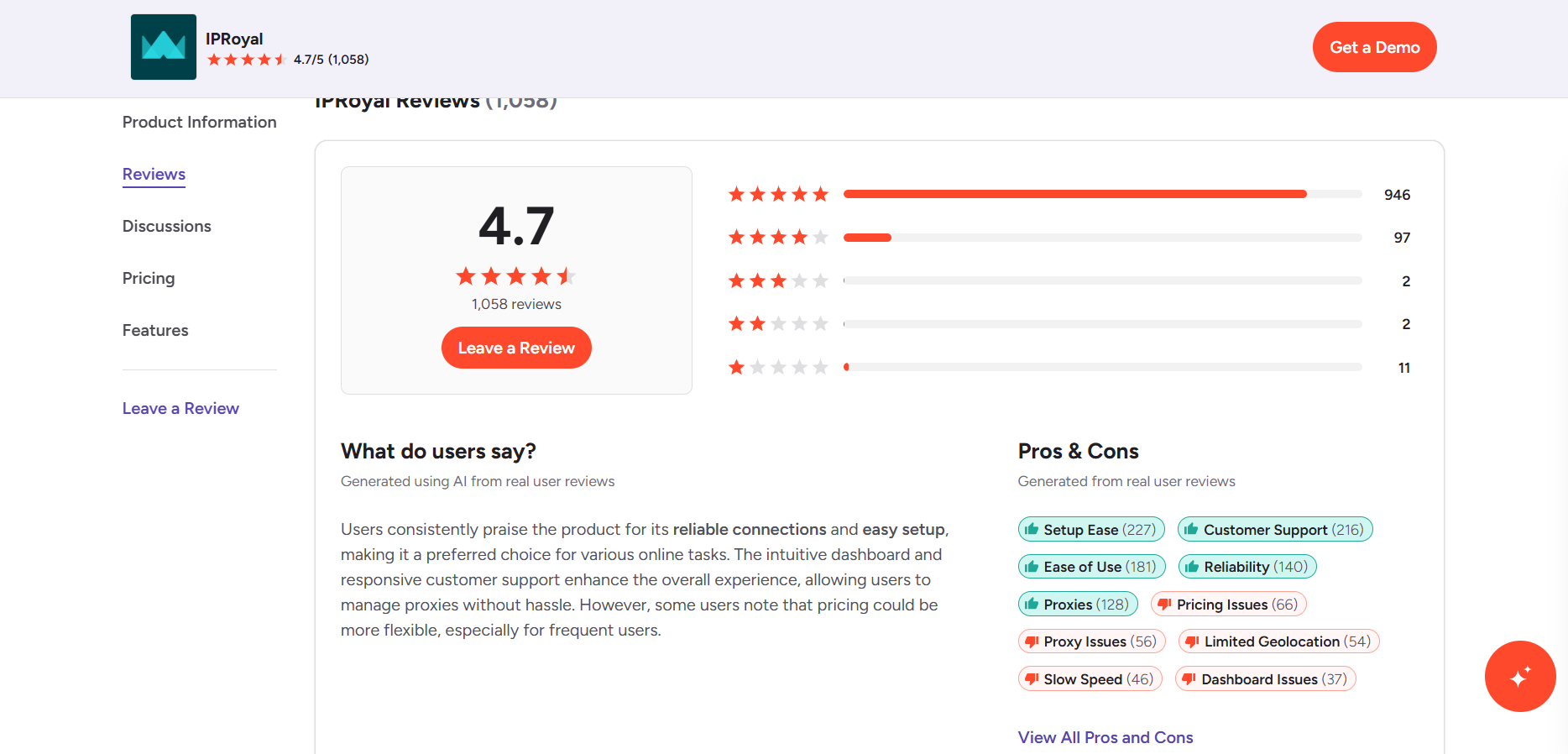
IProyal is among the leading proxy service providers. It has 1,000+ reviews on G2.com with an average rating of 4.7 out of 5 (as of late 2026). Users on G2 have praised the smooth dashboard, ease of setup, and fair quality proxies. Below is a snapshot of reviews on G2:
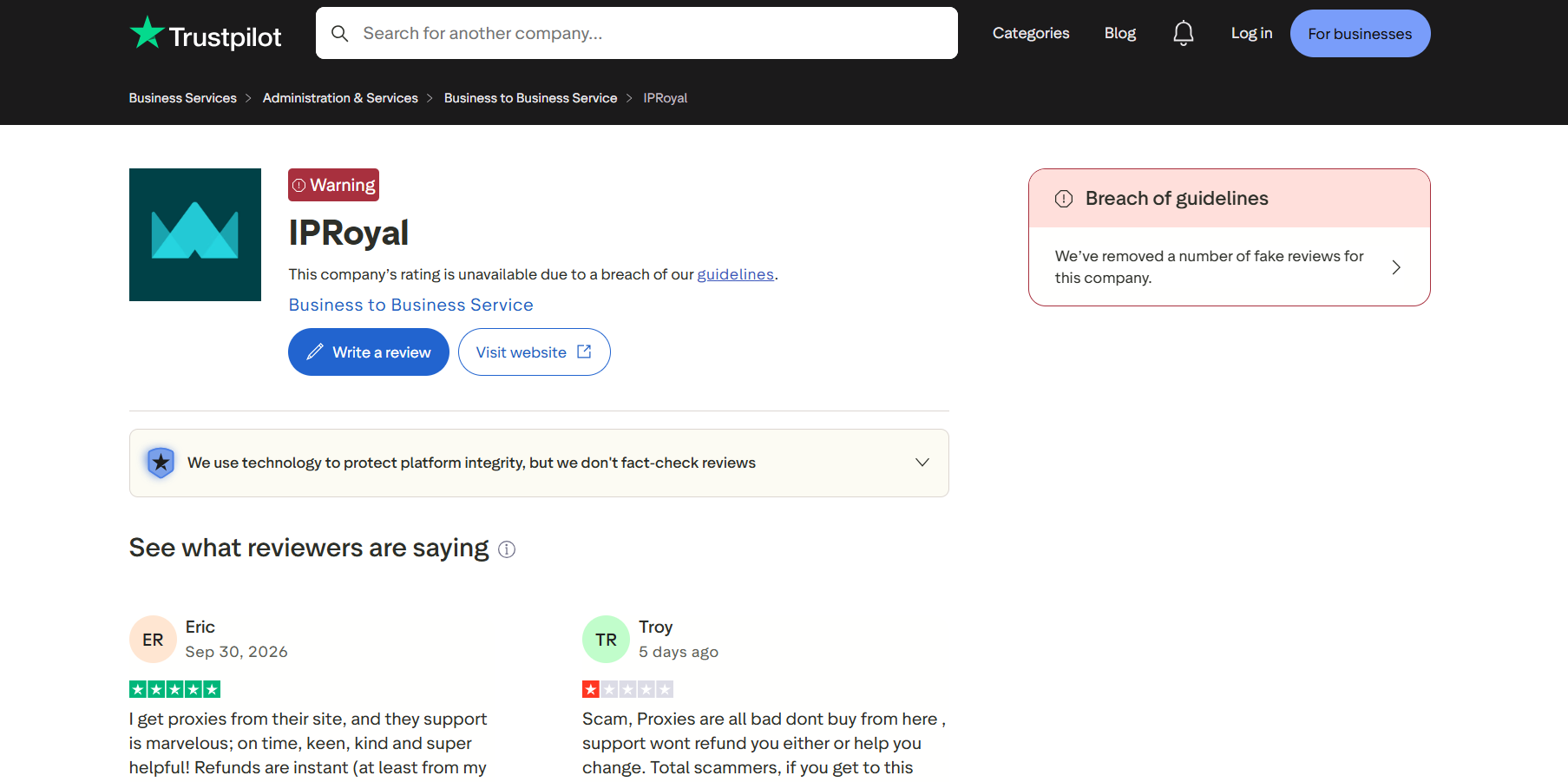
On Trustpilot.com, user reviews are mixed. Some users have reported a good experience, while others have complained that proxy quality is not up to the mark and refund policies are not great. However, Trustpilot has stated that it has removed a number of fake reviews for the company. That means reviews from users on Trustpilot may not be authentic. See the snapshot of Trustpilot below:
IPRoyal Residential Proxies
Residential proxies use IP addresses from real home internet connections. Users share their internet bandwidth using the Pawns app. Residential proxies are a great choice when websites block Datacenter IPs. IPRoyal sells residential proxies by traffic (per GB). Test results of residential proxies are below:
IP quality: I tested the IP quality of proxies with a Python script. 50 requests were made; I received 50 unique IPs (100% unique). IPs were assigned from many countries. The US was the most common (9 of 50). Argentina, Canada, and Brazil had 3 each. The biggest internet service providers were AT&T (3 IPs) and Rostelecom (2 IPs). Only 1 of 50 assigned IPs was flagged as “hosting” by the IP database that I used. It is normal for residential proxies. Overall, the quality of IPs seems good.
Location accuracy: I asked for the US, UK, and Germany Proxies. The IP country matched every time (30/30). Additionally, I requested New York City IPs. The country of IPs matched 10 out of 10, and the city matched 6 out of 10 times (60%). City data in IP databases is not always correct, so treat the city results as rough.
Rotation and sticky sessions: I configured the rotation and TTL settings in the residential proxy dashboard. During proxy rotation, 49 of 50 requests succeeded; one request failed. They gave me 49 unique IPs; none were repeated. For sticky sessions, I set the TTL option to 2 minutes. In the test, the IP remained the same for 119.9 seconds. That’s accurate.
Speed: In the speed test, the script made 20 requests with a residential proxy. As a result, the median total for a small request was 1824 ms, and 95% of requests finished in under 2,750 ms. All 20 requests worked. A 10 MB file downloaded at 0.9 Mbps on median (best: 1.9 Mbps, from 9 downloads; 1 download failed). Without using a proxy, my own connection gave 14.2 Mbps and 242 ms. The speed test results are slower than expected. Downloading large files can be troublesome. the sample size of this test is small. This is not a full benchmark; the results may vary.
Parallel requests: In the concurrency test, I sent 40 requests at 1, 5, 10, and 20 at a time. Success was 95%, 97.5%, 100%, and 100%. With 20 requests at a time, the median response time was 2.4 seconds. 95% of requests finished in under 3.6 seconds. Speed went from 0.45 to 6.1 requests per second. I did not test requests above 20 at a time. The concurrency test result is average; the response time is not that great.
Success rate: I made 25 requests to 5 test sites. 24 worked (96%). The one failure was a timeout on quotes.toscrape.com. The other four sites worked every time. The sites I tested include Wikipedia, books_toscrape, quotes_toscrape, httpbin, and more.
Privacy: I checked the headers a website receives. I saw no proxy headers and no sign of my real IP.
Data usage: The IPRoyal dashboard showed 9.1 MB used. My script estimated 10.2 MB. The dashboard number was lower than the script’s estimated usage, so I saw no sign of overbilling. This is a rough comparison.
Browser test: For testing a proxy with a browser, I used Playwright with the Chromium browser. The test website was books.toscrape.com. It is a simple page with around 20 images. I ran the Playwright script 5 times with everything loaded and 5 times with images, fonts, and media blocked. All 10 loads worked fine without any errors. The median load time was 6.9 seconds with everything loaded on the page and 6.3 seconds with blocking. Single runs ranged from 4 to 11 seconds. Blocking images, fonts, and media has reduced data usage. The median dropped from 0.70 MB to 0.46 MB (about 34% less), and the page made 10 requests instead of 31 requests. If you pay per GB, blocking images can save a lot of data bandwidth. However, it did not make pages load noticeably faster in my test.
Who it is good for / not for:
- Good for: moderate scraping, location checks, and jobs that need many different IPs.
- Not ideal for: large downloads.
IPRoyal Datacenter Proxies
They obtain Datacenter proxies from servers in data centers, not from home connections. They are fast and cheaper, but some websites block them more easily. IPRoyal’s datacenter proxies provide dedicated IPv4 addresses from 60+ locations. They are priced by IP. Test results are below:
IP quality: I bought one data center proxy and ran 3 checks; the IP stayed the same in all checks. The database listed it as Los Angeles and the provider as Karolio IT paslaugos. It did not flag the IP as a hosting IP. I expected a flag for a data center IP, so the free database may not know this range. I would not take this as proof that websites will see it as residential.
Speed: The result is much better than the residential proxies. one. A small request took 464 ms on median. 95% of requests finished in under 480 ms. My own connection took 238 ms, so the proxy added about 0.2 seconds. Compared to the residential proxy test, this response time is better. A 10 MB file downloaded at 9.5 Mbps on median (best: 11.0 Mbps). My own connection gave 15.3 Mbps. So there is a speed difference between the proxy and my connection when downloading a file.
Success rate: All 25 requests to the 5 test sites worked (100%). The sites are Wikipedia, books_toscrape, quotes_toscrape, httpbin, and more.
Parallel requests: In this test, I sent 40 requests at a time: 1, 5, 10, and 20. None of them failed. At 20 at a time, the median response was 464 ms and 95% finished in under 499 ms. That was about 40 requests per second. Response time barely changed as I added more parallel requests. Parallel requests in this test are faster than the residential proxy test.
Browser test: Playwright launched a Chromium browser for this test. The test page loaded in 2.4 seconds on median (5 runs), compared with 6.9 seconds in the residential proxy test. The data center proxy loads the page significantly faster. With images, fonts, and media blocked, it took 2.0 seconds and used 0.49 MB, down from 0.69 MB. Blocking images, media, and text can easily reduce data bandwidth. The data center proxy’s fair use policy limits usage to 100 GB per proxy per monthly cycle.
Who it is good for / not for:
- Good for: fast, high-volume scraping of sites that do not block data center IPs.
- Not ideal for: sites that block data center IPs, and jobs that need many different IPs (you get one fixed IP).
IPRoyal ISP Proxies
ISP proxies are static IPs, sourced from internet providers and hosted on data centers. IPRoyal offers dedicated IPv4 addresses sourced from ISPs worldwide. The same fair usage policy applies to ISP proxies also: 100 GB per proxy per monthly cycle. You can geo-target precisely by country, state, or city. IP whitelisting is allowed.
IP quality: The IP stayed the same in all 3 checks. The database listed the provider as Patriot Broadband and placed the IP in the US. It did not flag it as hosting. The city it gave (Honalo) is a small place, so I would treat city data for this IP as rough.
Speed: The speed test shows a slightly slower response time than data center proxies, though it’s still better than residential proxies. A small request took 514 ms on median. 95% finished in under 663 ms. That is about 0.28 seconds slower than my own connection (238 ms). A 10 MB file downloaded at 10.5 Mbps on median (best: 11.9 Mbps).
Success rate: All 25 requests to my 5 test sites worked (100%).
Parallel requests: All 40 requests worked at every level, up to 20 at a time. At 20 at a time, the median response was 468 ms and 95% finished in under 624 ms. That was about 25 requests per second.
Browser test: Used the Chromium browser with Playwright for this test. The test page loaded in 2.0 seconds on median. With blocking, it took 1.6 seconds. With an ISP proxy, the page loaded slightly faster than with a data center proxy.
Who it is good for / not for:
- Good for: tasks that need a stable IP with good speed.
- Not ideal for: jobs that need many different IPs, because you get a fixed IP.
IPRoyal Web Unblocker
Web Unblocker is a different kind of product. You send a normal request, and the service tries to get the page for you by handling IP changes and blocks. According to IPRoyal’s documentation, it works like an HTTP proxy. It supports only GET requests, and you must turn off HTTPS certificate verification. IPRoyal also advises against using it with browsers or Playwright, so I did not test it that way.
What I tested: I sent 25 requests to 5 public test sites, using the same script I used for the other products. As a second check, I sent 10 requests to the https://books.toscrape.com/ site using the plain Python example from IPRoyal’s documentation, with no custom headers.
Results: In my script test, 16 of 25 requests worked (64%). All 9 failures returned HTTP 422. In the second test, 7 of 10 worked and 3 failed. The failures happened on simple sites, so I do not think this was caused by strong bot protection. For comparison, the same sites worked 24 of 25 times through residential proxies, and 25 of 25 times through datacenter and ISP proxies. HTTP 422 isn’t listed in IPRoyal’s documentation, so I can’t say what caused it.
Who it is for / not for:
- Worth testing if: your target sites block normal proxies and you do not want to build your own anti-block setup.
- Probably not needed if: a cheaper proxy already works on your target sites. On the easy sites I tested, datacenter and ISP proxies worked every time.
IPRoyal Mobile Proxies
Mobile Proxies are dedicated IPs that are sourced from Mobile carriers worldwide. IPRoyal offers two plan types: Rotating mobile proxies, priced per GB, and dedicated proxies, priced per proxy. I did not test IPRoyal’s mobile proxies for this review. Websites often trust these IPs more, but they usually cost more than other types. A 1GB rotating mobile proxy costs $8 USD, and a dedicated fixed proxy costs $10 per proxy; test with a short trial before committing to a bigger plan.
IPRoyal Pricing:
Residential Proxies: Pay-as-you-go plan pricing starts from 7.35$ for 1GB. They offer volume discounts, so 2 GB costs $ 6.25 per GB. Subscription plans offer an extra 5% discount.
Datacenter Proxies: Pricing starts from 1.8$ per proxy for 30 days. They offer discounts for bulk purchases.
ISP proxies: Pricing starts from 4$ per proxy for 30 days. Discount applies on bulk purchase.
Mobile proxies: Rotating proxies pricing starts from 8$ per 1GB; discount applies on bulk purchase. Dedicated proxy costs $136.50 for 30 days.
Web Unblocker: Pricing starts from 1$ per 1000 Requests; volume discount applies on more requests purchase.
Prices checked in October 2026. They change, so check the live page before you buy.
Signing up and managing your account
KYC
Proxy networks provide anonymity, which opens the door for criminals and suspicious people. Nowadays, most proxy providers restrict users who have not gone through KYC verification. IPRoyal requires users to verify their identity after they sign up. They use a third-party platform that handles all checks and information management. Not completing identity verification restricts users from accessing certain websites, residential IP pools, and residential proxy APIs. The identity verification process is automated, and it takes a few minutes to complete.
Payments
Instead of paying for proxies directly, IPRoyal asks you to top up the account. The minimum deposit amount is 10 USD. Deposits never expire and can be used at any time to make purchases. The platform supports payments via credit cards, 25+ Cryptocurrencies, PayPal, Google Pay, Apple Pay, and Alipay.
Refunds
Some users are reporting negative experiences with their refund policy. If there is a connectivity issue, iproyal states that they can offer a refund under two conditions: if their team cannot resolve the problem within 24 hours, and for ISP and Datacenter proxies, if the user did not exceed a data consumption of 500 MB at the time of the request, they may offer a refund. For subscription cancellation, they state that the user is eligible for a refund if the request is submitted within 72 hours of purchase and the allocated data is not used in data-based plans. However, refunds for proxy-based plans require that the user not exceed 500 MB and submit a request within 72 hours. Please note that users are not eligible for refunds to the original payment method if payment was made via cryptocurrency. Overall, the refund policy seems fair from our perspective.
Dashboard and Support
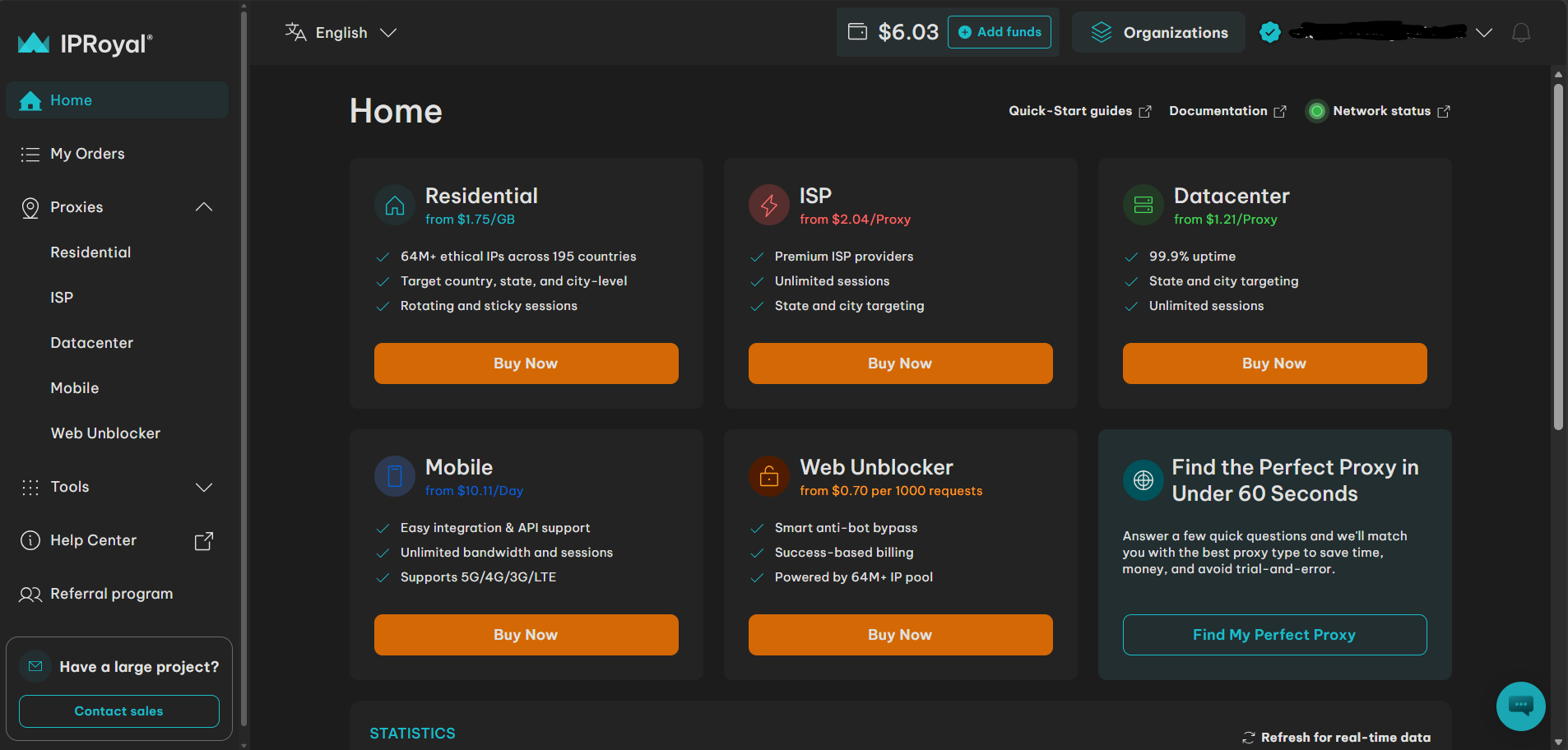
The iPRoyal dashboard is quite easy to use. All products are displayed on the dashboard, and “Buy Now” buttons take users to individual product purchase pages where users can configure a plan and complete checkout. The dashboard page contains a statistics chart where users can click proxy products to see usage and statistics. After making a purchase, the user can configure a proxy on the individual proxy dashboard. Changing the proxy username costs 0.20$.
 We were having a problem loading the login.live.com page via their residential proxy. IProyal provides customer support via live chat and email. I reached out to support via live chat. After I answered the chatbot’s initial questions, the customer support agent joined the chat within a minute. To resolve the issue, the agent enabled the “Skip ISP Static” option in my account and claimed that doing so would provide the most authentic IPs in the system. After enabling this option and trying to load the page, the problem persisted. After digging deeper with chat support, they enabled the IP Hostname option. Enabling this option from the residential proxy dashboard has resolved the problem, and the login.live.com page loaded successfully.
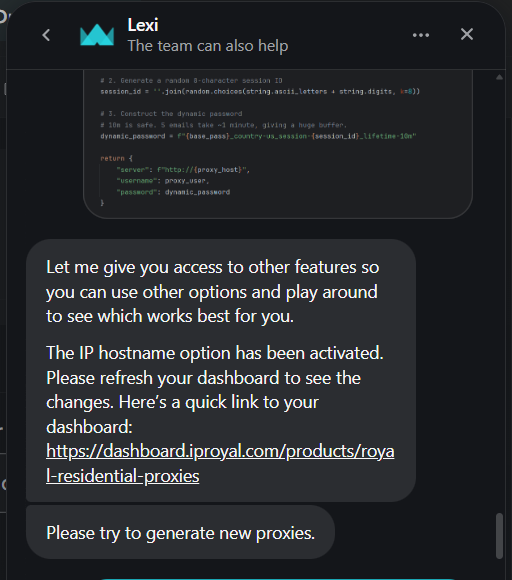
My overall experience with support was positive. You can reach out to support via live chat, which is available 24/7, instead of waiting for a response from email support. The support agent was professional and diagnosed the problem. If you want to troubleshoot the problem yourself, you can take a look at the documentation Home | IPRoyal FAQ. If you are a Discord user, you can also join their community server for more information about their products: https://discord.com/invite/SUA5yjpnZQ/.
IPRoyal Pros and Cons
Pros
Real, different IPs: 50 residential requests gave 50 different IPs. Only 2% were flagged as hosting.
Precise Geo Targeting: The country matched in 30 of 30 requests.
Accurate Sticky sessions: The IP stayed the same for the full 2 minutes I asked for.
The datacenter and ISP were fast and steady: Requests took about 0.5 seconds. All 25 page requests worked, and so did 40 requests at 20 at a time.
No header leaks: I saw no proxy headers and no sign of my real IP.
Works with Playwright: Residential, datacenter, and ISP proxies all loaded my test page in Chromium with Playwright.
Fair traffic counting: The dashboard showed usage that matched the script estimate.
Cons
Slow Residential Proxies: A small request took about 1.8 seconds, and file download speeds weren’t up to par.
A few timeouts: Some residential requests timed out in my tests. That is normal for residential proxies, but it means you need retries in your code.
Web Unblocker was not reliable in my test: 16 of 25 requests worked in my script test and 7 of 10 in IPRoyal’s own example. It supports only GET requests, and IPRoyal advises against using it with browsers.
Verdict
Overall, IPRoyal worked well in my tests except for the web unblocker. The residential proxies provided unique IPs, matching countries, and sticky sessions, which were precise. Residential proxies were slow, but requests were stable. Some proxies can be slow and troublesome. The data center and ISP proxies were fast and never failed on sites. Use those if your target site does not block data center and ISP proxies. Web Unblocker was the weak point; it had a lower success score, and the errors it showed on some requests were not explained in the documentation.
Frequently asked questions
Is IPRoyal good?
For general scraping and sites, yes
Is IPRoyal legit?
It is one of the leading proxy provider. Plenty of reviews on G2 and Trustpilot
Does IPRoyal traffic expire?
IPRoyal says purchased residential traffic does not expire.
Does IPRoyal work with Playwright?
Yes, for residential, datacenter and ISP proxies.
About the author
Ali Shair. Ali is a Software Engineer, tech enthusiast and reviewer with a loads of experience in software solutions.